How to run a compiled .rex model from command line for fast repeated cost-function evaluation
-
Hi,
I have the following use case.My REXYGEN model contains blocks with tunable parameters. One of the model outputs represents the value of interest, for example a cost function.
I would like to run the compiled model (
*.rex) from the command line as fast as possible, ideally offline rather than in real time. For each run, I need to:- provide a specific set of parameter values,
- execute one full evaluation of the model,
- obtain the resulting value of the selected output.
More specifically, I want to call the model repeatedly from an external environment such as Python or Julia in order to tune the parameters and minimize the cost function.
Could you please advise what is the recommended workflow for this in REXYGEN?
In particular, I would like to know:
- whether this can be done with the compiled
.rexmodel directly, - how to pass parameter values from an external program,
- how to read back the value of a selected output,
- and whether Local Simulation mode is the right approach for this kind of fast offline repeated evaluation, for example with a fixed number of simulation steps or counter ticks.
Is this workflow supported, and if so, what is the simplest way to implement it?
Thanks Stepan
-
@stepan-ozana Hi Stepan,
Thank you for your advanced question.
The proposed solution can look like the following:
- Run RexCore from the command line with specific simulation parameters:
RexCore -z simulation.enabled=1
Simulation-related parameters (other parameters can be found at /rex/rexcore/rexcore.cfg.help):
simulation.enabled=1 // turns on simulation mode simulation.tickmin=0 // minimum tick time in milliseconds (if calculations finish earlier, sleep is done; default 0, so no sleep is done) simulation.steps // number of ticks after start, then the run stops simulation.start // date and time before the start of the simulation; default 0, i.e. Rex epoch 1.1.2000 00:00:00- Load set of input parameters - use
SILO/SILOSfunction block orSTATELOAD/STATESAVEfunction block. - At the end of the simulation, you can store the results using the same FB as mentioned in 2. It is also possible to read the result values via the REST API. The RexCore will continue running after the specified tick count, but the blocks will no longer be executed.
If you have any additional questions, just let me know.
Regards,
Tomas - Run RexCore from the command line with specific simulation parameters:
-
@cechurat Hi Tomas,
Thank you for your valuable comments.
I tried running:
"c:\Program Files\REX Controls\REXYGEN 3.0.5.17331\Bin\RexCore.exe" -z exec.file=myproject_exec.rex -z simulation.enabled=1 -z simulation.tickmin=0 -z simulation.steps=20000 -z simulation.start=0
I do not think it was successful, because it did not do anything. At the very least, it was supposed to create
f.txtvia the SILO block.I believe there may be something wrong with this REXYGEN project, because whenever I try Local Simulation within REXYGEN Studio, it reports a RexCore crash; please see the screenshot in the bottom-right corner. As a consequence, the application freezes and I have to kill the RexCore process manually.
In Real Time mode, it seems to run normally: it shows trends and creates
f.txtvia the SILO block. There is also a minor issue with overtime in diagnostics, probably related to the PYTHON blocks. I am not sure whether this issue is critical enough to cause RexCore to crash in Local Simulation mode.However, I believe this is a separate issue and is not directly related to the original topic of running Local Simulation mode in general.
Below you will find the project version needed to reproduce the issue.
Best regards,
StepanProject:
FC_Compact_Rezerovar_REXYGEN_V2.zip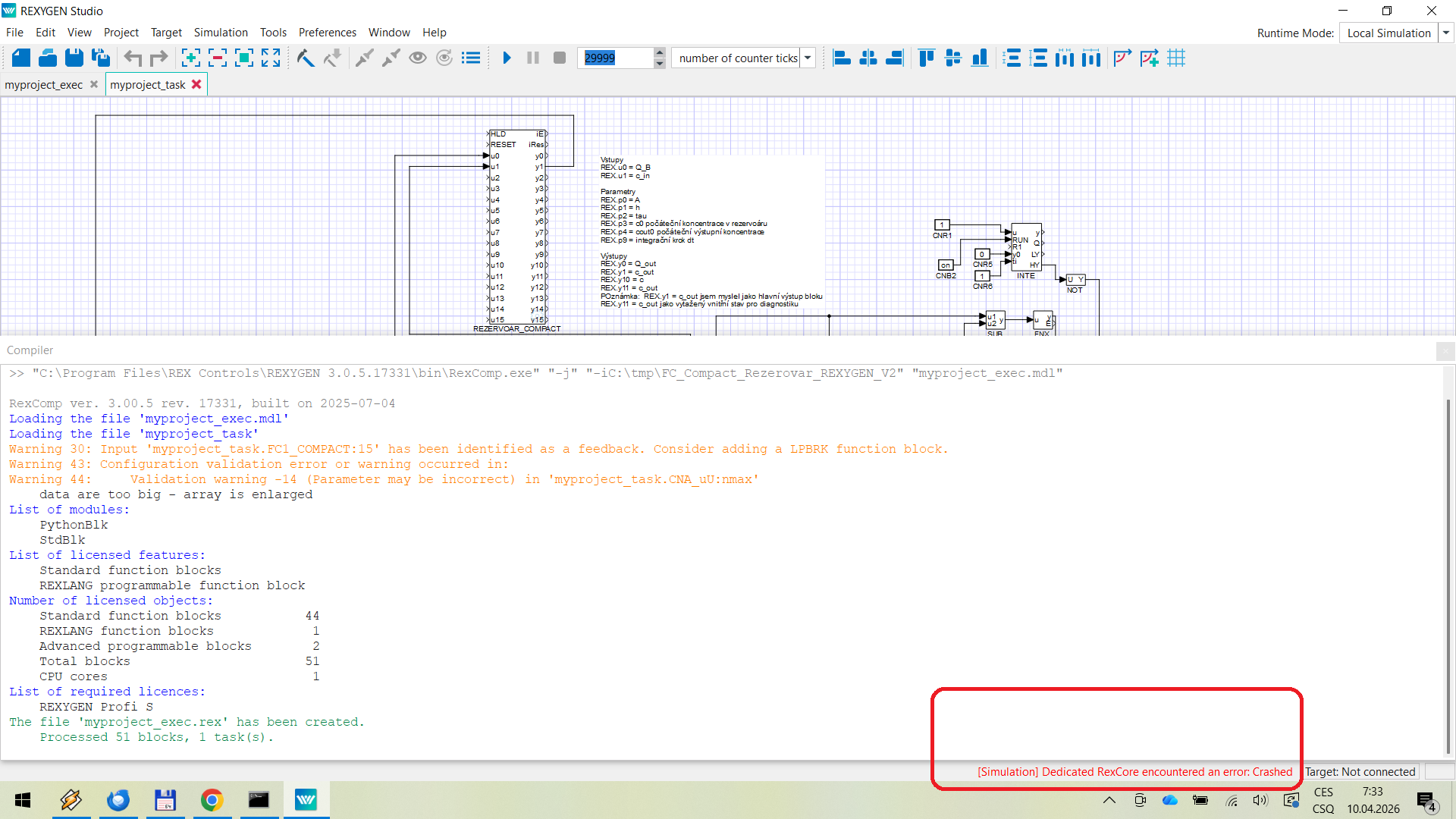
-
@stepan-ozana Hi Stepan,
Thanks for sharing your experiences. Please, can you provide
kanal2_od_000645.csvfile? It is to be loaded in compile time in blockCNA_uU.Thanks.
Tomas
-
@cechurat
Yes, sure. Sorry I forgot to upload previously. -
@stepan-ozana Hi Stepan,
Thanks for the data file.
I can confirm that I'm able to run the project using ResCore on localhost. I'm also able to run your project in the Simulation mode invoked via Studio.
Please, try out the following: In the project folder (where all the mdl files and Python files are stored), create an empty folder
simrootand try to run the simulation via Studio again. (This tells simulation mode to use thesimrootfolder as a root folder for RexCore)You can also try to run the simulation from the command line:
- Copy the compiled project
myproject_exec.rexinto folderC:\ProgramData\REX Controls\REX_<VERSION>\rexcore\and rename it toexec.rex - Run command:
"C:\Program Files\REX Controls\<REXYGEN_VERSION>\Bin\RexCore.com" -C <PATH>, where<PATH>is relative/absolut path to<PROJECT_FOLDER>\simroot\rexcore\rexcore.cfgfile. This config file is already prepared for simulation. You can change its parameters if desired.
Please note that using
RexCore.cominstead ofRexCore.exekeeps the process running in the command line along with all the System Log printouts, which could provide a clue as to what is preventing you from using the simulation mode.Let me know if you have any progress on this.
Kind regards,
Tomas - Copy the compiled project
-
@cechurat
Hi,
I apologize for the delayed response. I needed to consult this issue further before getting back to you.Afterwards, I verified the following behavior: after creating the simroot folder and enabling write access to it, running my project in Simulation mode causes crashes. The issue disappears when I set log.file.enabled=1 in rexcore.cfg.
This can be used as a temporary workaround, although it slightly slows down execution, especially when the simulation is run repeatedly many times.
If there is a better systematic solution, please let me know.
Best regards,
Stepan