REXYGEN Community Forum
    • Categories
    • Recent
    • Tags
    • Popular
    • Login

    HMI Designer 3.2.5

    Scheduled Pinned Locked Moved REXYGEN HMI Designer
    16 Posts 3 Posters 2.7k Views
    Loading More Posts
    • Oldest to Newest
    • Newest to Oldest
    • Most Votes
    Reply
    • Reply as topic
    Log in to reply
    This topic has been deleted. Only users with topic management privileges can see it.
    • cechuratC
      cechurat @MikeyH
      last edited by

      @MikeyH Hi Mike!

      Do you use the same versions of Development tools and REXYGEN Runtime?
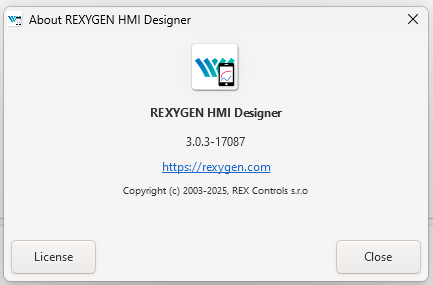
      beac153b-556a-46bc-86c1-b18189593ac1-image.png

      The TRND not providing any data seems to be disabled - is it active in the running project?

      The error message about parsing the output can be omitted - the extension returns something which throws this error. It won't affect the behaviour of the HMI. We will try to fix it. Can you share your source files with us?

      Kind regards,
      Tomas

      M 1 Reply Last reply Reply Quote 0
      • M
        MikeyH @cechurat
        last edited by

        @cechurat Hi Tomas,

        My versions are below.
        36eb2e35-47d4-4518-b398-af75e6271a8f-image.png
        0e48016d-a583-4dec-8fd8-13261ecffa86-image.png

        The parse error has gone now. What seems to happen now is after I set the connect strings in the HMI configuration, it doesn't save them so are always blank when I open it again.
        48f5394f-696e-4ca0-af30-f8a48d8f2a86-image.png

        Thanks for your help with this

        cechuratC 1 Reply Last reply Reply Quote 0
        • cechuratC
          cechurat @MikeyH
          last edited by

          @MikeyH Hi Mike,

          Thanks for reporting this. This is really weird. Please, can you record and share your screen? E.g. using online tool https://gifcap.dev/

          Kind regards,
          Tomas

          M 1 Reply Last reply Reply Quote 0
          • M
            MikeyH @cechurat
            last edited by

            @cechurat Hi Tomas,

            I will try and record this this week, sorry for the delay.

            Cheers,
            Mike

            M 1 Reply Last reply Reply Quote 0
            • M
              MikeyH @MikeyH
              last edited by

              Hi Tomas,

              Sorry fo rthe huge delay in this! Things happned.

              Do you know why this was happening in the end?

              Cheers,
              Mike

              cechuratC 1 Reply Last reply Reply Quote 0
              • cechuratC
                cechurat @MikeyH
                last edited by

                @MikeyH Hi Mike,

                I'm not sure about this specific issue but we have already moved forward with native Inkscape integration of REXYGEN component.

                Can you try out REXYGEN HMI Designer version 3.4.5? You can get it here: https://download.rexcontrols.cz/partner/daily/rexygen/hmidesigner/signed/

                Kind regards,
                Tomas

                M 1 Reply Last reply Reply Quote 0
                • M
                  MikeyH @cechurat
                  last edited by

                  @cechurat Hi Tomas,

                  I have it downloaded, how do I use this version? I can't see any extensions like previous versions or any way to link it to REX

                  Cheers,
                  Mike

                  cechuratC 1 Reply Last reply Reply Quote 0
                  • cechuratC
                    cechurat @MikeyH
                    last edited by cechurat

                    @MikeyH Hi Mike,

                    Sorry, I forgot to mention one important thing: In your current REXYGEN installation, open the file C:\Program Files\REX Controls\REXYGEN 3.0.X.YYYYY\HmiDesigner\version.req and change its contents to 3.4.

                    The new HMI Designer requires REXYGEN v3 (I recommend using the latest available 3.0.5)

                    Then the Studio should automatically use the new HMI Designer. You can check it in the compile log after you compile any project with HMI.

                    Let me know if it helped.

                    Tomas

                    M 1 Reply Last reply Reply Quote 0
                    • M
                      MikeyH @cechurat
                      last edited by

                      @cechurat Hi Tomas,

                      Should HMI designer be opened from the tray monitor or via the HMI design program it self?

                      I still can't see the REXYGEN extension, or does this version work differently?
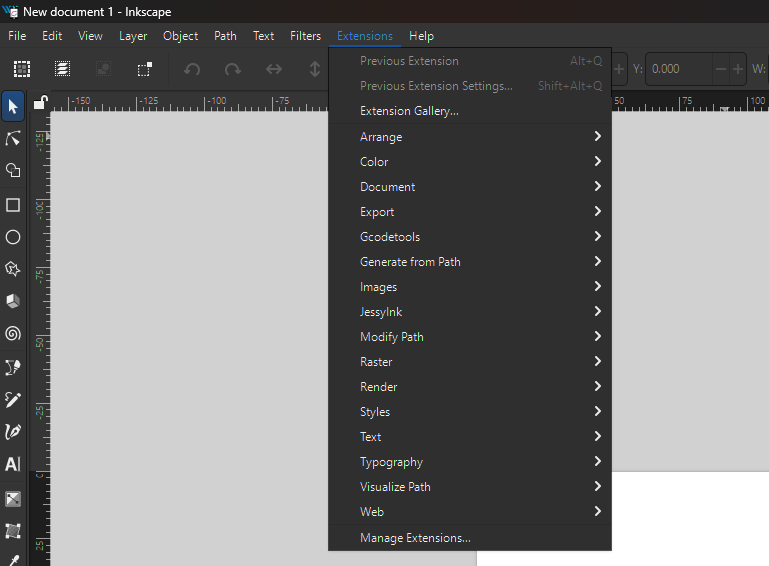
                      ab4e203c-a84e-4f54-92ca-93033271055b-image.png

                      Cheers,
                      Mike

                      1 Reply Last reply Reply Quote 0
                      • ondrej_severaO
                        ondrej_severa
                        last edited by ondrej_severa

                        Dear @MikeyH ,
                        if you open directly the HmiDesigner from C:\Program Files\REX Controls\HmiDesigner 3.2.5\bin\HmiDesigner.exe you will not see any extensions.

                        You have to use the HmiDesigner.exe from the REXYGEN installation e.g., C:\Program Files\REX Controls\REXYGEN 3.0.6.17802\HmiDesigner\HmiDesigner.exe

                        This is also the way TrayMonitor opens the program. If you have any file association for *.svg, check whether it uses HmiDesigner.exe in the REXYGEN folder.

                        This is a known limitation, and we will try to solve it in a future version.
                        Best regards
                        Ondrej

                        1 Reply Last reply Reply Quote 0
                        • First post
                          Last post

                        This is a community forum for REXYGEN users and fans. Detailed information can be found at REXYGEN homepage.

                        There is also an outdated REXYGEN community forum.

                        Powered by NodeBB.